

Chrome extension and local bridge
 Chrome extension and local bridge
Ankara Chrome Bridge
Connect your AI assistant to your own Chrome. Let it read tabs, navigate, fill forms and take screenshots. Everything stays on your computer.
Release facts: Version 2.0.1 · MIT license · Free · Windows, macOS, Linux
How it works
- 01
Your AI client
Claude, Cursor, Codex, Gemini
- 02
MCP server
on your computer, stdio
- 03
Local bridge
127.0.0.1, this device only
- 04
Chrome extension
your own tabs
Your client starts the bridge in the background on the first command. The extension connects within 30 seconds at most.
Install in three steps
- 1
Download and extract
Download the ZIP file and extract it to a permanent folder. Do not move the folder after installation.
ankara-chrome-bridge-2.0.1.zip - 2
Add the extension to Chrome
Open chrome://extensions, turn on Developer mode, click “Load unpacked” and select the extension folder.
chrome://extensions - 3
Connect your AI
Open a terminal in the folder and run the command below. Apply the line for your client and restart the client.
python bridge/ankara_bridge.py setup
Configuration for your client
The setup command prepares these lines with your folder path. If you write them by hand, replace <folder> with the place you extracted the ZIP.
claude mcp add --scope user ankara-chrome -- python "<folder>/bridge/ankara_bridge.py" mcpWhat your AI can do
Read
chrome_list_tabsLists open tabs
chrome_read_pageReads page text and optionally HTML
chrome_find_elementsDescribes elements matching a selector
chrome_screenshotTakes and returns a screenshot
Navigate
chrome_open_tabOpens a tab and leases it to the agent
chrome_navigateLoads an address
chrome_go_backGoes back
chrome_switch_tabBrings a tab to the front
chrome_close_tabCloses a tab
Act
chrome_clickClicks by CSS selector
chrome_click_textClicks by visible text
chrome_fillFills a form field
chrome_press_keyPresses keys such as Enter or Tab
chrome_wait_forWaits until content appears
chrome_execRuns JavaScript in the page
You stay in control
- This computer only
- The bridge listens on 127.0.0.1 only. Page content goes only to the AI client you choose; nothing is sent to Ankara Yazılım.
- Closed to web pages
- Sites you visit cannot send requests to the bridge. The bridge accepts only this extension, identified by its fixed ID.
- Stop in one click
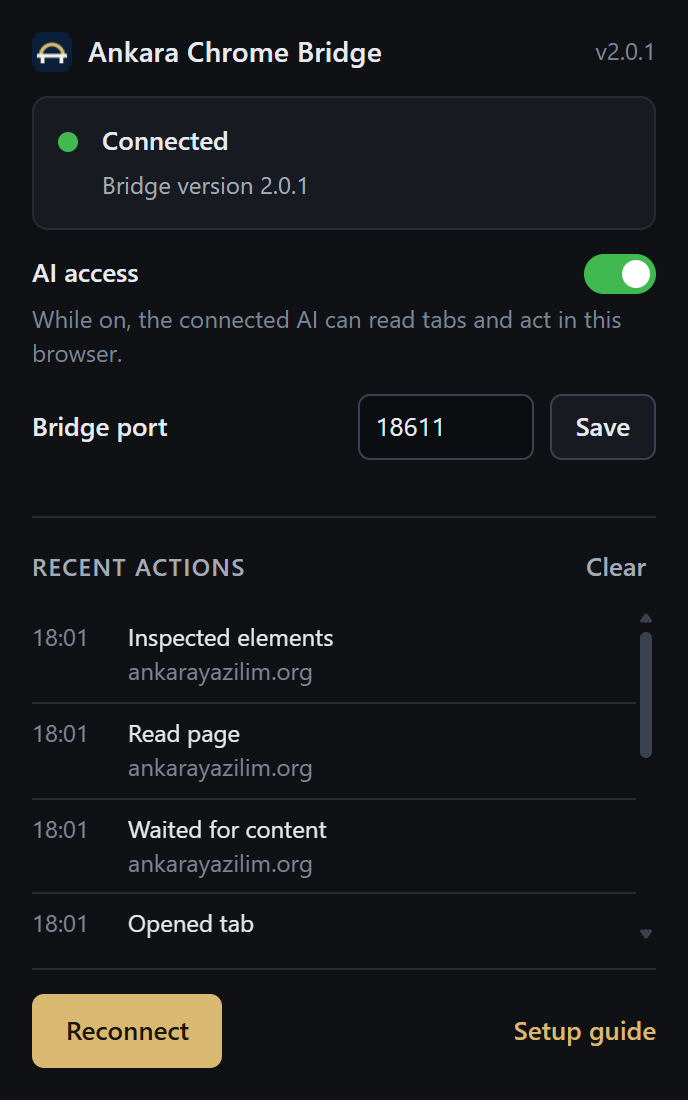
- Turn off “AI access” in the extension popup and no command runs. “Recent actions” shows what was done.
- Visible debugging
- Screenshots and key presses use Chrome’s debugging interface, and Chrome shows a warning bar while it is in use. This is expected.
Frequently asked questions
Where does my data go?
Nowhere. The bridge runs on your computer and page content goes only to your own AI client. The extension’s action log is cleared when the browser closes.
Which AI tools does it work with?
Any client that supports MCP. Tested with Claude Desktop, Claude Code, Cursor, Windsurf, VS Code, Codex CLI and Gemini CLI.
Why is Developer mode needed?
The extension is distributed as a ZIP for now, not through the Chrome Web Store. Chrome installs such extensions with “Load unpacked” in Developer mode.
How do I check the download?
Compare the file’s SHA-256 with the value on this page. On Windows: certutil -hashfile ankara-chrome-bridge-2.0.1.zip SHA256 · On macOS and Linux: shasum -a 256 ankara-chrome-bridge-2.0.1.zip
How do I uninstall it?
Stop the bridge with “python bridge/ankara_bridge.py stop”, remove the extension on chrome://extensions, delete the ankara-chrome entry from your client settings and delete the folder.
Download
The package contains the Chrome extension, the local bridge, the MCP server and the setup guide in Turkish and English.
- File
- ankara-chrome-bridge-2.0.1.zip
- Size
- 229 KB
- Version
- 2.0.1
- Released
- 07.10.2026
SHA-256
ab3bbb92cfbe3ebe0c36dfddf78afc2ee63a933e4421f592f7596d3364f9abfasha256sums.txtAlways the latest versionQuestions and suggestions: info@ankarayazilim.org